
Developer's API Documentation : Contexts
Syncing
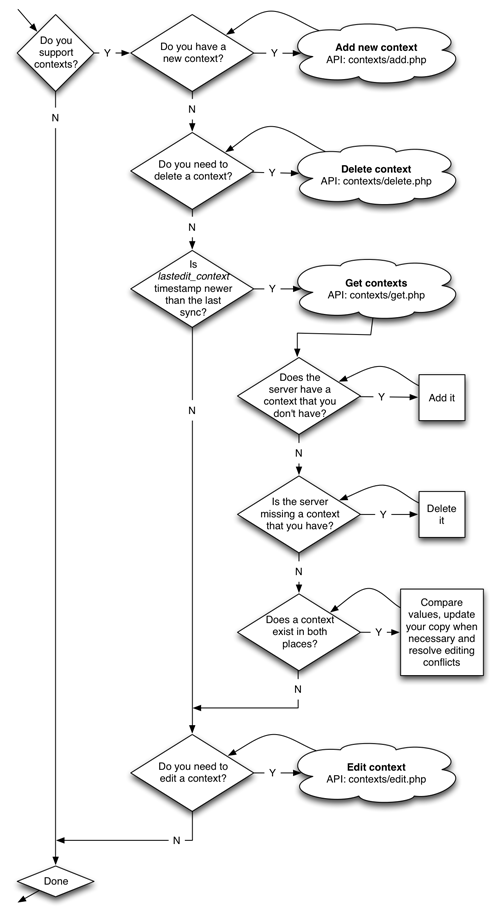
Syncing contexts is fairly straight forward. The first thing to do is add any new contexts you have created and delete any contexts that you have deleted. Then, look at the "lastedit_context" timestamp returned from Account Info to determine if any changes have happened on the server since the last time you synced. If yes, then you need to fetch the contexts from the server and integrate this into your local copy. This is where you would do conflict resolution if a context was edited in both places. After this, if you have any contexts that you edited, you can send these edits up to the server.
Retrieving Contexts
The "contexts/get.php" API call will return a list of your contexts with their names and id numbers. You can access this via GET or POST.
http://api.toodledo.com/2/contexts/get.php?key=YourKey
This call will return a JSON encoded object that looks like this.
JSON:
[{"id":"123","name":"Work"},{"id":"456","name":"Home"},{"id":"789","name":"Car"}]
You can also specify xml as the output format for any API calls by attaching "f=xml" to the URL.
http://api.toodledo.com/2/contexts/get.php?key=YourKey;f=xml
XML:
<contexts>
	<context><id>123</id><name>Work</name></context>
	<context><id>456</id><name>Home</name></context>
	<context><id>789</id><name>Car</name></context>
</contexts>
Adding Contexts
Add a context using the "contexts/add.php" API call. You can access this via GET or POST. Context names must be unique within an account. If you try to add a context that already exists, you'll get an error. Each user can have up to 1000 contexts. If you try to add more than this, you will get an error.
- name : A text string up to 32 characters. (required)
http://api.toodledo.com/2/contexts/add.php?name=MyContext;key=YourKey
If the add was successful the new context will be returned.
JSON:
[{"id":"12345","name":"MyContext"}]
XML:
<contexts>
	<context><id>12345</id><name>MyContext</name></context>
</contexts>
Editing Contexts
Edit a context using the "contexts/edit.php" API call. You can access this via GET or POST. Context names must be unique within an account. If you try to edit the context name to one that already exists, you will get an error. If you try to edit the context, but pass in the same values that already exist on the server, you will get an error. You should avoid making unnecessary edits.
- id : The id number of the context to edit. (required)
- name : A text string up to 32 characters. (required)
http://api.toodledo.com/2/contexts/edit.php?id=12345;name=MyContext;key=YourKey
If the edit was successful the edited context will be returned.
JSON:
[{"id":"12345","name":"MyContext"}]
XML:
<contexts>
	<context><id>12345</id><name>MyContext</name></context>
</contexts>
Deleting Contexts
The "contexts/delete.php" API call will allow you to permanently delete a context. You can access this via GET or POST. Any tasks that have this context will have their context set to "none".
- id : The id number of the context to delete. (required)
http://api.toodledo.com/2/contexts/delete.php?id=12345;key=YourKey
If the delete was successful you will get the following message.
JSON:
{"deleted":"12345"}
XML:
<deleted>12345</deleted>
Error Codes
Any of the API calls can return error messages. Here is a list of the error messages that you may receive from the contexts API.
- 1 : You did not specify a key for authentication.
- 2 : The authentication key that you provided has expired or is invalid.
- 3 : No context was specified. The id number is a required paramater.
- 4 : The context specified in your call does not exist.
- 5 : You tried to add or edit a context with a name that already exists.
- 6 : The user has the maximum number of contexts (1000), so you can't add any more.
- 7 : You tried to add or edit a context without a name. A context must have a name.
- 8 : You tried to edit a context with values that already exist. Nothing was changed. If you get this a lot, you are making unnecessary edits.
- 100 : Unknown Error.
- 500 : The Toodledo server is offline for maintenance.
Examples:
JSON:
{"errorCode":1,"errorDesc":"Empty key"}
XML:
<error id="5">A context with that name already exists</error>