
Developer's API Documentation : Notes
Overview
The Notes section of Toodledo (sometimes called Notebook) is an entire section for long form notes that users can create. Notes can be organized into folders. Don't confuse this with the smaller notes that can be attached to a task.
Syncing
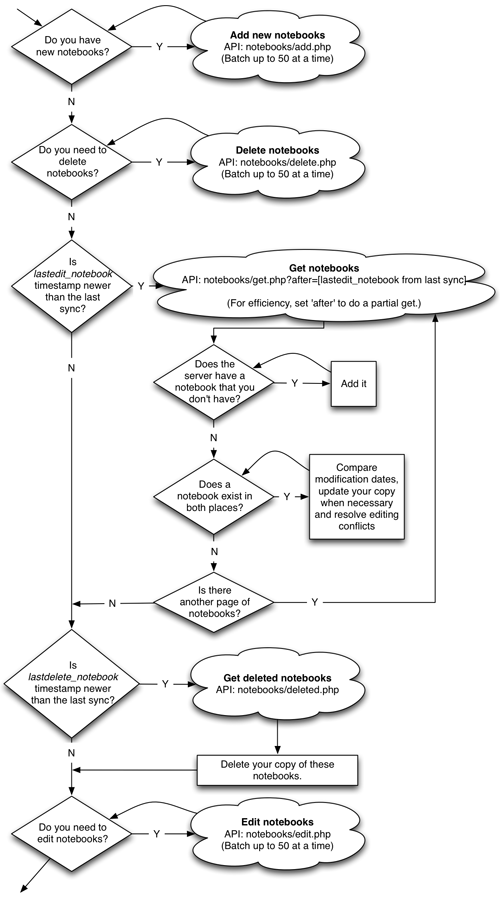
If you use the following recommendations you can sync notes cleanly and efficiently. One of the most important things is to use the "lastedit_notebook" and "lastdelete_notebook" timestamps, returned from Account Info, to determine if any changes have happened on the server before you fetch anything. In the vast majority of cases, when syncing, nothing will have changed on the server and you won't even need to do anything.
Note Datatypes
There are a number of fields that can be set or retrieved when working with notes. Here is a description of these fields.
- id : The server id number for this note. It is guaranteed to be unique per account, but two different accounts may have two different notes with the same id number.
- title : A string for the name of the note. Up to 255 characters. When setting, please encode the & character as %26 and the ; character as %3B.
- folder : The id number of the folder. Omit this field or set it to 0 to leave the note unassigned to a folder.
- modified : A GMT unix timestamp for when the note was last modified.
- added : A GMT unix timestamp for when the note was added.
- private : A boolean (0 or 1) that indicates if the note is flagged as a private entry. Currently, the website ignores this flag, but you may choose to provide additional security for private note entries.
- text : A text string up to 62,000 bytes long. When setting, please encode the & character as %26 and the ; character as %3B.
Retrieving Notes
The "notebooks/get.php" API call will return a list of the notes that match your search parameters. You can access this via GET or POST. The following search parameters may be used to limit the returned notes. To make sync go as efficiently as possible you should request the minimum amount of data that you need. Usually, this means keeping track of the "lastedit_notebook" field from the account/get.php API call and using this in combination with the "modafter" field in this call to request only those notes that have changed since your last sync.
- modbefore : A GMT unix timestamp. Used to find notes with a modified date and time before this date and time.
- modafter : A GMT unix timestamp. Used to find notes with a modified date and time after this date and time.
- id : The id number of the note that you want to fetch. This is useful if you already know the id number and only need to fetch the one note.
- start : The number of records that you want to skip before printing results. Use this in combination with "num" if you want to paginate your results. The default value is 0.
- num : The number of records to go through until output is stopped. Use this in combination with "start" if you want to paginate your results. The default value is 1000.
http://api.toodledo.com/2/notebooks/get.php?key=YourKey;modafter=1234567890
This returns a list of notes in the JSON format, like this.
JSON:
[{"num":"2","total":"2"}, {"id":"1234","title":"My Ideas","modified":1281990824,
"added":1281990824,"folder":"123","private":"0","text":"The text of my notebook"},
{"id":"1234","title":"Favorite Movies","modified":1281990824,
"added":1281990824,"folder":"123","private":"0","text":"Star Wars"}]
You can also specify xml as the output format for any API calls.
http://api.toodledo.com/2/notebooks/get.php?key=YourKey;modafter=1234567890;
fields=folder,star,priority;f=xml
XML:
<notebooks num="2" total="2">
	<notebook>
		<id>1234</id>
		<title>My Ideas</title>
		<folder>123</folder>
		<private>0</private>
		<modified>1234567890</modified>
		<added>1234567890</added>
		<text>The text of my notebook</text>
	</notebook>
	<notebook>
		<id>1235</id>
		<title>Favorite Movies</title>
		<folder>123</folder>
		<private>0</private>
		<modified>1234567890</modified>
		<added>1234567890</added>
		<text>Star Wars</text>
	</notebook>
</notebooks>
Adding Notes
You can add up to 50 notes at a time by making a POST to the "notebooks/add.php" API call. You can set the following fields: title, folder, private, added, text.
There is also a special field called "ref" that you can use to pass through an id number to aid in matching things up after a sync. The "ref" field is not saved into the note, it is only echoed back to you on this call.
Notes are added by creating a JSON object (example below) and submitting a POST to the API. Be sure to encode the data properly for transfer via a URL (symbols replaced with their %XX equivalent and spaces encoded as +). Each element in the array will be a note object. You only need to set the fields that you want to set. For efficiency, you should try to send only the fields that you are setting.
http://api.toodledo.com/2/notebooks/add.php?key=YourKey;
notebooks=[{"title"%3A"My Ideas"}%2C{"title"%3A"Favorite Movies"%2C
"folder"%3A"123"%2C"text"%3A"Star Wars"%2C"ref"%3A"98765"}]
If the action was successful the added notes will be returned in the same order in which they were added. If there were any errors on individual notes, they will be output inline with the returned notes, so you can determine which action failed.
JSON:
[{"num":"2","total":"2"}, {"id":"1234","title":"My Ideas","modified":1281990824,
"added":1281990824,"folder":"123","private":"0","text":"The text of my notebook"},
{"id":"1234","title":"Favorite Movies","modified":1281990824,
"added":1281990824,"folder":"123","private":"0","text":"Star Wars","ref":"98765"}]
You can also specify xml as the output format for any API calls.
http://api.toodledo.com/2/notebooks/add.php?key=YourKey;
notebooks=[{"title"%3A"My Ideas"}%2C{"title"%3A"Favorite Movies"%2C
"folder"%3A"123"%2C"text"%3A"Star Wars"%2C"ref"%3A"98765"}]
XML:
<notebooks>
	<notebook>
		<id>1234</id>
		<title>My Ideas</title>
		<folder>123</folder>
		<private>0</private>
		<modified>1234567890</modified>
		<added>1234567890</added>
		<text>The text of my notebook</text>
	</notebook>
	<notebook>
		<id>1235</id>
		<title>Favorite Movies</title>
		<folder>123</folder>
		<private>0</private>
		<modified>1234567890</modified>
		<added>1234567890</added>
		<text>Star Wars</text>
		<ref>98765</ref>
	</notebook>
</notebooks>
Editing Notes
You can edit up to 50 notes at a time by making a POST to the "notebooks/edit.php" API call. The id field is required, and the following fields are optional: title, folder, private, text (see above for possible values).
Notes are added by creating a JSON object (example below) and submitting a POST to the API. Be sure to encode the data properly for transfer via a URL (symbols replaced with their %XX equivalent and spaces encoded as +). Each element in the array will be a note object. You only need to set the fields that you want to edit. For efficiency, you should try to send only the fields that have changed.
http://api.toodledo.com/2/notebooks/edit.php?key=YourKey;
notebooks=[{"id"%3A"1234"%2C"title"%3A"My Note"}%2C
{"id"%3A"1235"%2C"title"%3A"Favorite Movie"%2C"folder"%3A"123"}];f=xml
If the action was successful the edit notes will be returned. If there were any errors on individual notes, they will be output inline with the returned notes, so you can determine which action failed.
JSON:
[{"num":"2","total":"2"}, {"id":"1234","title":"My Ideas","modified":1281990824,
"added":1281990824,"folder":"123","private":"0","text":"The text of my notebook"},
{"id":"1234","title":"Favorite Movies","modified":1281990824,
"added":1281990824,"folder":"123","private":"0","text":"Star Wars"}]
You can also specify xml as the output format for any API calls.
http://api.toodledo.com/2/notebooks/edit.php?key=YourKey;
notebooks=[{"id"%3A"1234"%2C"title"%3A"My Note"}%2C
{"id"%3A"1235"%2C"title"%3A"Favorite Movie"%2C"folder"%3A"123"}];f=xml
XML: <notebooks> <notebook> <id>1234</id> <title>My Note</title> <folder>123</folder> <private>0</private> <modified>1234567890</modified> <added>1234567890</added> <text>The text of my notebook</text> </notebook> <notebook> <id>1235</id> <title>Favorite Movie</title> <folder>123</folder> <private>0</private> <modified>1234567890</modified> <added>1234567890</added> <text>Star Wars</text> </notebook> </notebooks>
Deleting Notes
The "/notebooks/delete.php" API call will allow you to permanently delete up to 50 notes at a time. You can access this via GET or POST.
Notes are deleted by submitting a JSON encoded array of id numbers to the API.
http://api.toodledo.com/2/notebooks/delete.php?key=YourKey;notebooks=["1234"%2C"1235"]
If the action was successful the deleted note's id numbers will be returned. If there were any errors on individual notes, they will be output inline with the returned notes, so you can determine which action failed.
JSON:
[{"id":"1234"},{"id":"1235"}]
You can also specify xml as the output format for any API calls.
http://api.toodledo.com/2/notebooks/delete.php?key=YourKey;notebooks=["1234"%2C"1235"];f=xml
XML:
<deleted>
	<id>1234</id>
	<id>1235</id>
</deleted>
Get Deleted Notes
The "/notebooks/deleted.php" API call will enable you to detect when a note was deleted on Toodledo, so you can also delete the note from your application. You can access this via GET or POST.
- after : A GMT unix timestamp. Used to find notes with a deletion date and time after this date and time.
http://api.toodledo.com/2/notebooks/deleted.php;key=YourKey;after=1234567890
This returns a list of id numbers and datetime stamps.
JSON:
[{"num":"24"},{"id":"1234","stamp":"1234567891"},{"id":"1235","stamp":"1234567892"}]
You can also specify xml as the output format for any API calls.
http://api.toodledo.com/2/notebooks/deleted.php?key=YourKey;after=1234567890;f=xml
XML:
<deleted num="2">
	<notebook>
	<id>12345</id>
	<stamp>1234567891</stamp>
	</notebook>
	<notebook>
	<id>67890</id>
	<stamp>1234567892</stamp>
	</notebook>
</deleted>
Error Codes
Any of the API calls can return error messages. Here is a list of the error messages that you may receive from the goals API.
- 1 : You did not specify a key for authentication.
- 2 : The authentication key that you provided has expired or is invalid.
- 3 : Only 50 notes can be added/edited/deleted at a time.
- 4 : You didn't specify any notes to add/edit/delete.
- 6 : The maximum number of notes allowed per account (10000) has been reached.
- 7 : Invalid note ID number.
- 8 : Invalid folder ID.
- 12 : Nothing was changed. You'll get this error if you attempt to edit a note but don't pass any parameters to edit.
- 100 : Unknown Error.
- 500 : The Toodledo server is offline for maintenance.
Examples:
JSON:
{"errorCode":1,"errorDesc":"Empty key"}
XML:
<error id="5">The notebook title cannot be blank</error>